Releases
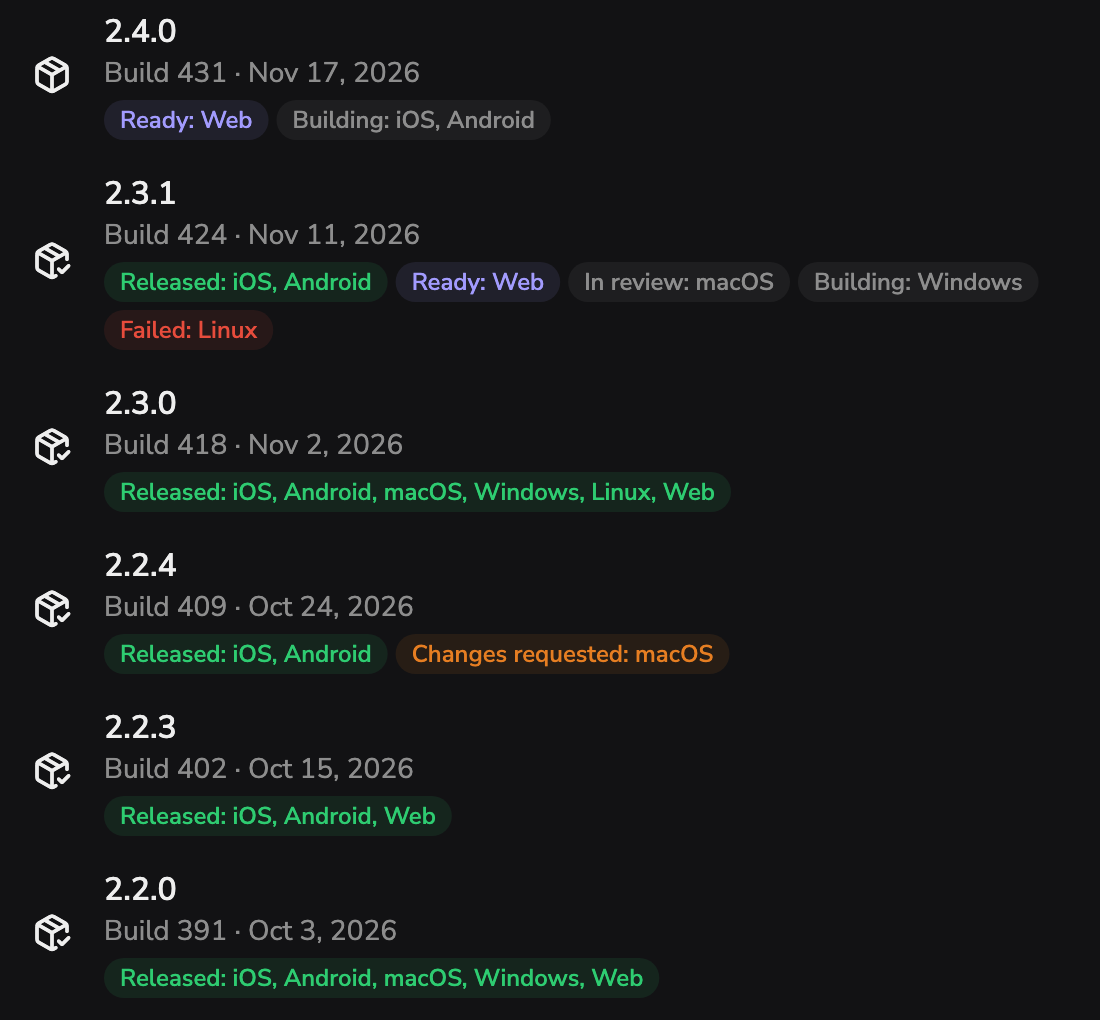
One build, a status for every platform
Each release lists where it stands on every platform: released, ready, in review, building, failed or changes requested. Send out the ready builds when you choose.
For indie developers and small app teams
Waitlists, releases, support and performance for your apps, in one console.
For teams shipping on iOS, Android, macOS, Windows, Linux and the web.
The first member of every team is free
One build, six platforms
Features
A project turns on only the features it uses. These are the screens you work in, exactly as the console draws them.
Releases
Each release lists where it stands on every platform: released, ready, in review, building, failed or changes requested. Send out the ready builds when you choose.
Waitlists
Your app joins a list by its ID. Search, add, export and remove people, and joining twice answers the same.
A fact worth knowing
Joining twice answers the same.
So the public key inside your app can't be used to find out who is on a list.
Support
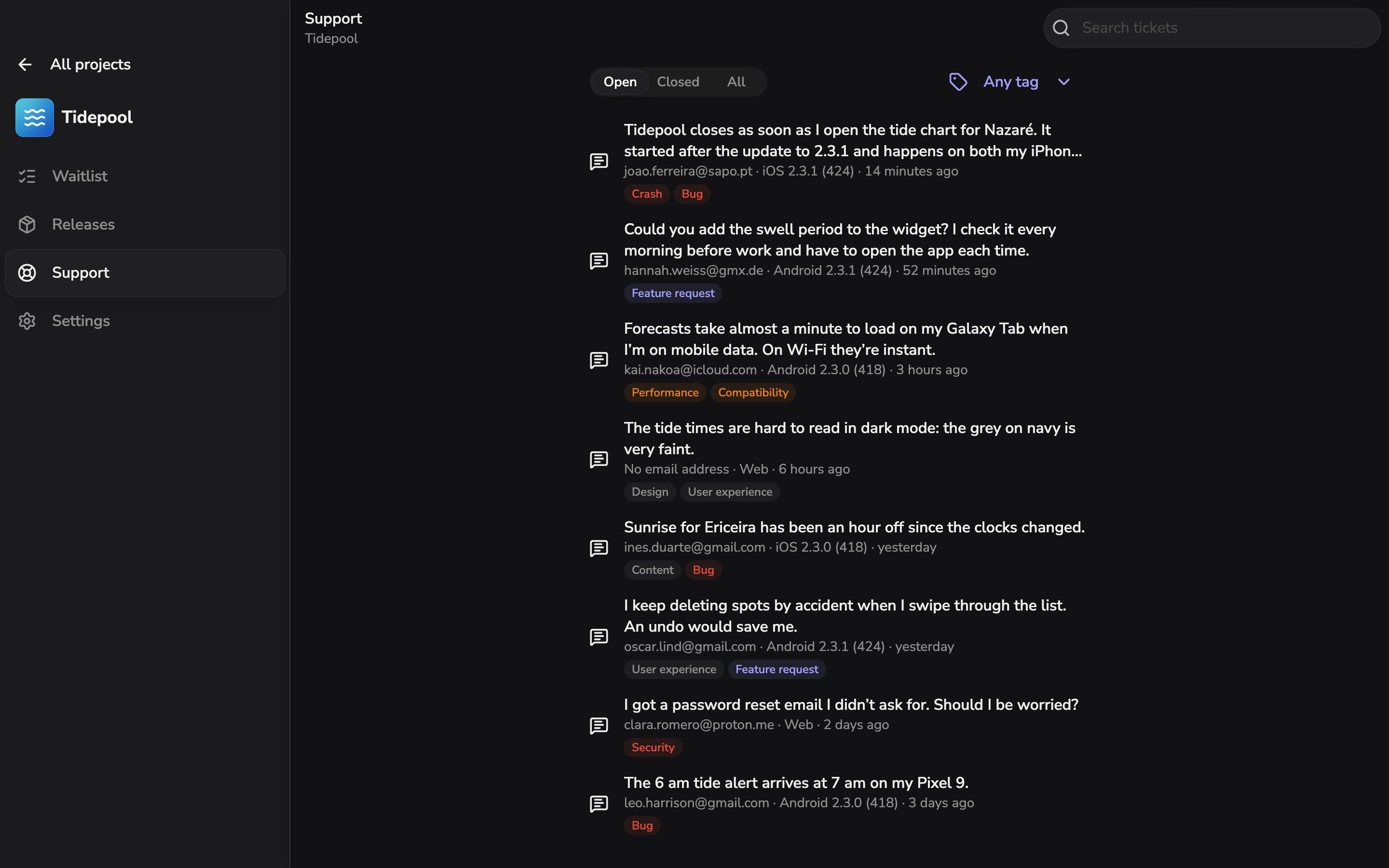
Jev, TypeSafe's decision model, tags each ticket. Filter open or closed tickets by tag, or search them.
The nine tags Jev can give
A ticket can carry several. Each one keeps its message, and the email, platform and app version when people send them.
Supervise
Your apps send their launch and screen timings, their own events and errors. Open any session to see what happened, in order.
What it measures
The median, p90 and p99 of each, by release, platform and environment. Kept for 90 days.
Teams and access
Access policies grant project permissions to people and groups. Members can come through SSO and SCIM.
Per project, you can grant
People on your verified domain join at once. Sessions are listed per device, and the activity log shows who did what, API keys and AI apps included.
AI assistants
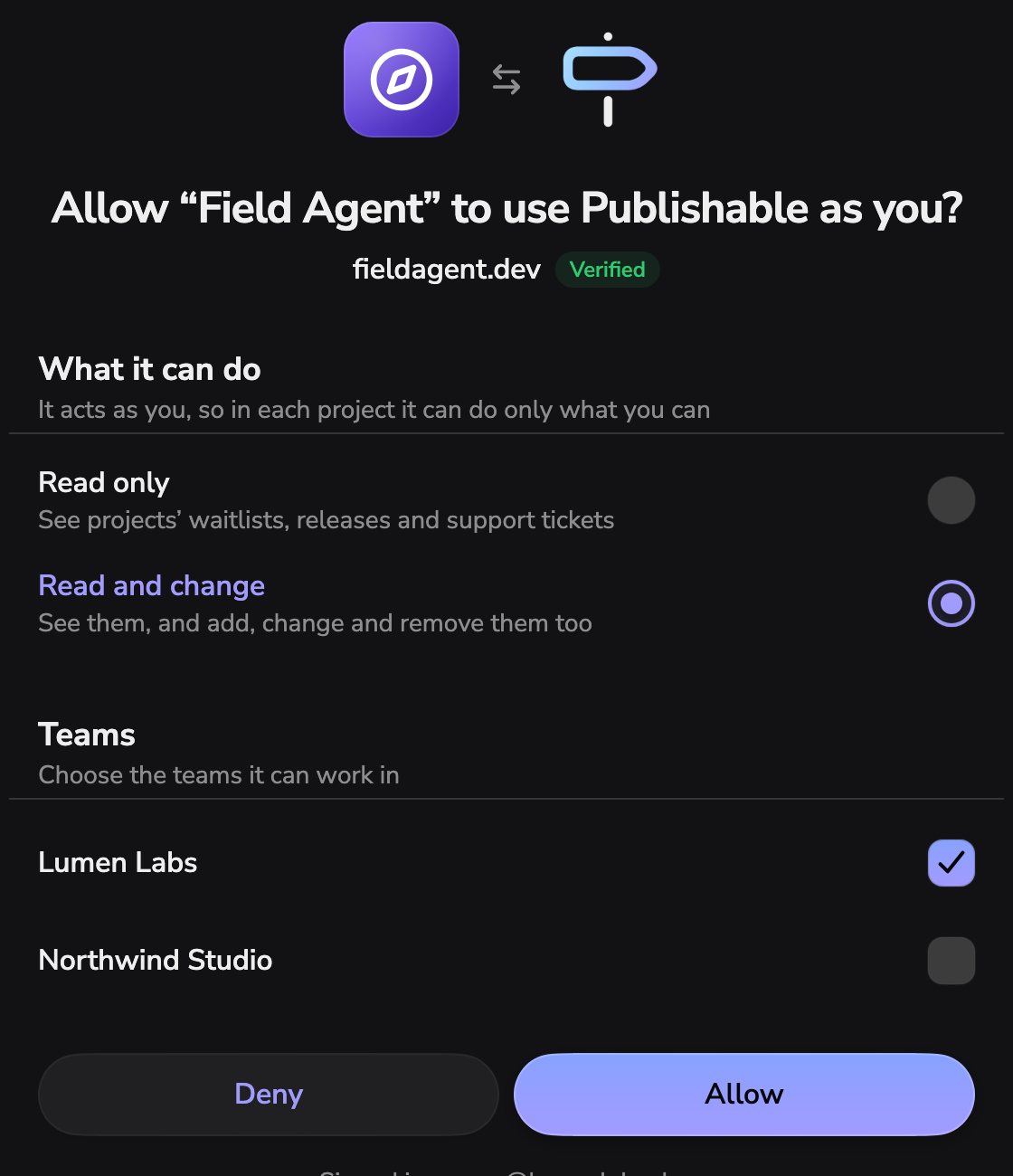
Add the MCP server to an assistant and sign in. You choose read only or read and change, and the teams it works in. Connected apps stay listed in your account, where you can disconnect them.
API
Secret keys for your servers, CI and scripts, each with only the permissions you give it. The reference covers every route, field and error, as OpenAPI.
From your server, CI or scripts
Authorization: Bearer psk_…

# A project API key, holding
# only what it was given.Calls to the public API are not charged.
Code is half
the app.
Publishable runs
the other half.
How it works
POST https://client-api.publishable.app
  /v1/waitlists/wl_pro/entries

X-Publishable-Key: pk_live_4Tq8nRw2ZsK7vYc1
Content-Type: application/json

{ "email": "joao.ferreira@sapo.pt" }

# Joining twice gets the same answer,
# so the public key reveals nothing.
GET https://client-api.publishable.app
/v1/releases/latest?platform=ios
X-Publishable-Key: pk_live_4Tq8nRw2ZsK7vYc1
# Answers with the newest released build:
# version, build, notes and download_url.
# Your app offers it as the update.Downloads from update offers are counted per release.
Pricing
Your team tops up a balance in US dollars through Stripe, from $5. You pay for people beyond the first and for what your apps send through the client API.
Members
Client API usage
Each will be priced per unit. Until then the console counts them and charges nothing.
Never charged
Indie developers and small app teams shipping on iOS, Android, macOS, Windows, Linux and the web. It keeps everything around an app after the code: who is waiting for it, which build is out where, how fast it runs, and what people say about it.
No. Your CI builds it and reports building or failed for each platform. The store review reports in review, changes requested, ready or unavailable, and you release what is ready from Publishable.
No. Joining a list twice gets the same answer as joining once, so the public key in your app cannot reveal whether an email is already on it. In the console you can search, add, remove and export a list as CSV.
Publishable takes it back for that platform automatically. You can also withdraw a platform yourself, from the release's page.
It asks the client API for the latest release on its platform and gets the newest released build: version, build, notes and a download link. Downloads are counted per release.
How fast your app starts on real devices: cold and warm launch, first render and when it is ready for input, how fast each screen renders, and how long an update takes to download. Your app can also send its own events, warnings and errors. Each comes with its release, platform and environment, and any session can be opened to see what happened, in order. Data is kept for 90 days.
Point it at the MCP server at api.publishable.app/mcp and sign in with your account. You pick its teams and whether it may only read or also change things. It then acts as you, with only what you may do. It is listed with your connected apps, where you can disconnect it, and what it does lands in the activity log.
Your team tops up a prepaid balance in US dollars through Stripe, from $5. The first member of every team is free; each other member is $20 a month or $200 a year. Client API usage (waitlist entries, support tickets, release downloads and Supervise events) will be priced per unit. The public API and MCP are not charged.
In the console on the web at console.publishable.app. The console also comes as an app for iPhone, iPad and Mac.

Waitlists, releases, support and performance for every app your team makes, in one console.
Open the console